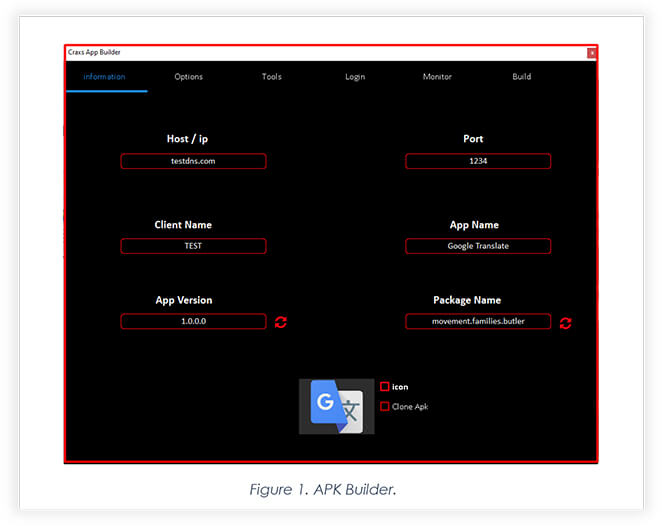
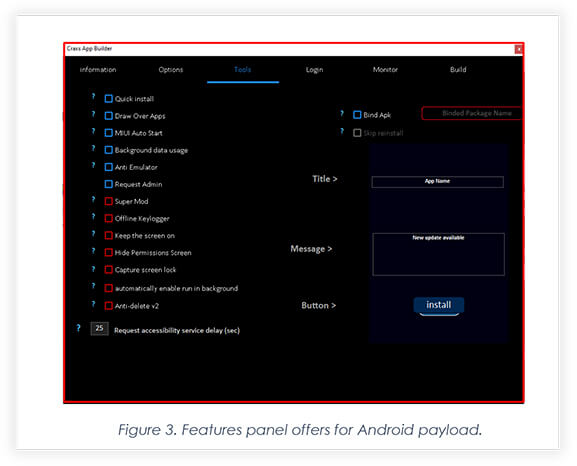
The updated Craxs Remote Administration Tool now includes an additional build option. The primary build option is already available, offering a range of destructive features with a few new add-ons, however, the Android package in the primary build contains code similar to what was previously reported, i.e. the new add-on to the panel enables threat actors to create a dropper. When combined with well-planned social engineering, this feature can further ensnare Android users. In our further analysis, we delve into the dropper’s functionality and how the payload code serves as a dropper.
The final build page allows threat actors to choose permissions they want to exploit and then generate the main payload.
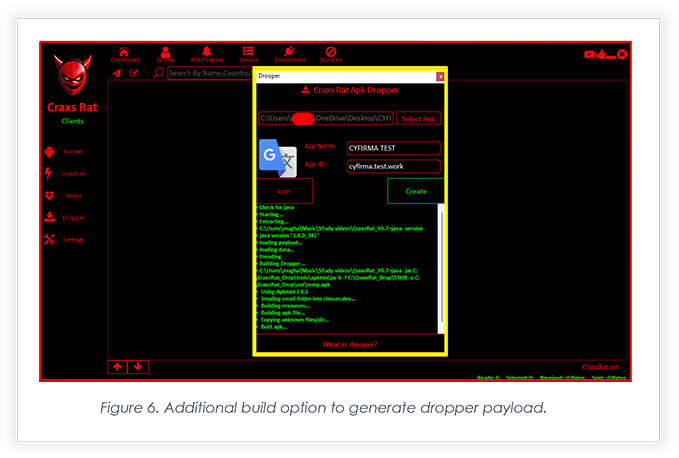
Figure 6 highlights a new add-on to the tool. This new build option allows threat actors to build an Android package that will help attackers to deliver the main payload to fully compromise the device.
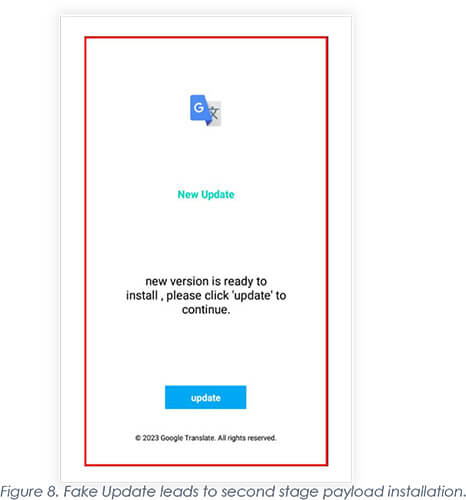
When it is opened after installation, victims are taken to the page where the background dropper fetches the main payload. The user interface, meanwhile, displays ‘Downloading updates’ graphics.
Are you on WhatsApp?
And Want to keep an eye on a friend, boyfriend or even you husband?
Here's a simple trick to do it, without even touching their phone.
Imagine how will it be to hack your friends WhatsApp account and
check on his activities, who he communicates with, or rather flirts with
? Exciting right?
Here's a very simple and quick trick for the WhatsApp users to spy on their friend's messages, by just knowing their contact number.
Hack Friend's WhatsApp with these Simple Tricks
You just need the WhatsApp number you want to hack and spy on and you are there!
Here's how any and every iOS and Android smartphone users can try these free and online tricks to hack any WhatsApp account in less than 5 min. STEP 1: Go to your phone's app store and download WhatsApp Sniffer & Spy Tool
STEP 2: Open the app, enter the person's number, whose account you wish to hack
STEP 3: Wait for 2-3 min for the hacking to be processed and then click on 'Verify option'
STEP 4:
Now you can get access to your friend's messages, images, videos, or
any other information that he has stored over the last 30 days
instantly.
Facebook rolled out Avatars, its take on Bitmoji, in the U.S. this week
Facebook Avatar is Bitmoji. Facebook rolled out Avatars, its take on
Bitmoji, in the U.S. this week. An Avatar (also known as a profile
picture or userpic) is a graphical representation of a user or the
user’s alter ego or character.
It may take either a two-dimensional form as an icon in Internet forums and other online communities or a three-dimensional structure, as in games or virtual worlds. Avatar images have referred to as “picons” (personal icons) in the past, the usage of this term is uncommon now.
Avatar Origins
The word avatar originates in Hinduism, where it stands for the
“descent” of a deity in a terrestrial form (deities in Hinduism are
popularly thought to be formless and capable of manifesting themselves
in any form). The earliest use of the word avatar in a computer game was
the 1979 PLATO role-playing game Avatar.
Facebook Avatar
An avatar can also refer to a text construct found on early systems
such as MUDs. The term “avatar” can refer to the personality connected
with the screen name, or handle, of an Internet user. The appearance of
social media structures, which includes FB, where users aren’t generally
nameless, brought about sizable utilization of profile snapshots
presenting a picture of oneself on the one’s platforms, now and then
with filters.
How To Clone SIM Card Under 15 Minutes
[Step by Step Guide] Clone SIM Card: Before we go further, I would like to make one thing clear SIM Card Cloning is illegal.
This tutorial should be used for educational purposes only. After this,
you can be able to Clone SIM Card easily but don’t harm others Mobile Phones are everyone’s need
nowadays, people mostly do their confidential talks over cell phones,
But only some of them know how easy it is to eavesdrop them, there are
some tricks and hacks to do that, but the most powerful way is to clone
their SIM Card.
How to clone SIM card to use in 2 phones
The Subscriber Identity Module aka SIM Card is the transmitter of the signal to the mobile and tower. Our SIM cards contain two secret codes or keys called IMSI (International Mobile Subscriber Identity) and Ki (Authentication Key ),
which enables the operator to know the mobile number and authenticate
the customer, these codes are related to our mobile numbers which the
operators store in their vast database, it is based on these secret keys
that enable the billing to be made to that customer.
Details of a SIM Card
The main mission of cloning a SIM Card is to get KI and IMSI codes,
these codes are the identifier of the SIM Card, and help you register
your mobile to the network.
How to duplicate SIM card to use on two phones?
Is it possible to clone a sim card?
By extracting these two secret codes from the SIM and program it into
a new blank smart card. Since the operator authentication on SIM is
based on these values, it enables us to fool the operators into thinking
that it’s the original SIM, this authentication is a flaw with the GSM
technology.
Now which SIM cards can be cloned?
Not every SIM Card is cloneable, only some SIM card are clonable, let us learn, which one.
SIM cards are manufactured based on three algorithms COMP128v1,
COMP128v2 and COMP128v3. It is important to note currently only
COMP128v1 version SIM cards can be cloned, since this is the only
algorithm, which has been cracked, bear in mind that 70% of all the SIM
cards we use are COMP128v1, at the time of writing this post.
Things Required :
Blank Programmable SIM Card: I got this one from Amazon, you can also buy one on eBay
A SIM Firmware Reader/Writer: I also got this on Amazon, but it’s available on eBay also.
Download and install: MagicSIM
Download and install: USB SIM Card Reader
Access to the victim’s SIM for about 15 to 20 minutes 😉 Update: If you found your Internet connecting speed drowning while downloading these files, follow the guide on how to increase internet speed via cmd(
if you’re on windows 😉 ), this will slightly tweak your internet speed
if the problem is from operating system’s side, otherwise it totally
depends upon your ISP.
Step 1: Remove the SIM from the phone, place it in the card reader, click read from the card in magic SIM.
When it displays ‘connected’, select crack SIM in the toolbar.
Step 2: Click strong KI and select all of the other find options and then click start.
Once your KI is found and the crack is finished, click the file, save as and save your cracked SIM info to a file.
Step 3: You must click disconnect from the file menu or you will ruin your SIM card. [Important, Otherwise SIM will crack] Step 4: Once it says disconnected. Remove the SIM. Put the SIM in your phone and see if it still works, it should.
Unlock SIM Card
Go to phone tools, select SIM card, then select unlock SIM, it will prompt for a code. Call network provider, they will ask for your phone number, your
account info, name, and security code, then they will ask why you want
to unlock your SIM card, just tell them you need to unlock your SIM to
get it to work with your overseas phone or something. Once they give you the SIM unlock code, enter it, and it will say SIM unlocked. Step 5: Insert blank SIM card and open USB SIM Card Reader Software not magic SIM at this point.
Step 6: Click connect. It should say ‘No Info Found’ if it is truly blank. Step 7: Select write to SIM, it will prompt you to select a .dat file, select the one you saved earlier. Step 8: Now click start, it will take about 10
minutes to write it, once it is complete, it will ask for a security
code, enter the security code the network provider gave you, then click
Finish. DONE: You have successfully cloned a SIM Card.
Conclusion
Now when somebody calls the victim, Both of the mobiles will ring,
same will happen in the case of SMS, But only one can pick up the
call. It should be noted that if you try to make two calls at the same
time, one will connect; the other will say call failed, both phones will
get the same messages, text, and voice, and both will receive the same
calls, but only one can talk at a time.
Android is great, but sometimes, the version you get with your phone—whether its vanilla Android or something like Samsung's TouchWiz—leaves a bit to be desired. Here's how to install a new version of Android (or ROM) on your device for an even better Android experience.
What's a ROM?
One of the best things about the openness of the Android platform is that if you're unhappy with the stock OS, you can install one of many modified versions of Android (called ROMs) on your device. A new ROM can bring you the latest version of Android before your manufacturer does, or it can replace your manufacturer-modded version of Android with a clean, stock version. Or, it can take your existing version and just beef it up with awesome new features—it's up to you.
If you're familiar with Linux, it's sort of similar to installing a different Linux distribution. Each version of the OS has a specific goal in mind, and as such differs quite a bit from the others. Which one you choose is dependent on your priorities and how you use the device. You'll need to unlock your bootloader and flash a custom recovery (more info on that here), but once you get the hang of it, it's not too difficult.
Step One: Unlock Your Bootloader and Flash a Custom Recovery
First, let's clear up some confusion: Contrary to popular belief, you do not actually need to root your phone to flash a ROM—you just need to unlock your bootloader and flash a custom recovery. However, this process usually goes hand-in-hand with rooting—and most custom ROMs come with root access—so what you think of as "rooting your phone" is probably what you're going to have to do first.
Unfortunately, we can't go through this step in detail here, because it's different for every phone! So, I highly recommend checking out our everything root guide to learn a bit more about what's involved, what all the different terms mean, and what to watch out for. Then, search around sites like XDA Developers for instructions on how to unlock the bootloader of your specific phone, which recovery you should use (usually TWRP or ClockworkMod), and how to flash it.
I also recommend rooting your phone during step one, since it'll make the backup process in step two easier—and save you some hassle along the way. A lot of methods and one-click apps will root your phone anyways, so it might be included in the process. Again, this can vary from phone to phone. (If the instructions require you to flash SuperSU.zip, you can refer to step three of this guide for info on how to do that—ironically, it's just like flashing a ROM).
NOTE: Unlocking your bootloader will most likely wipe your phone, and without root access, you won't be able to back up very much. So, save anything you want to keep on your computer—you will have to set up your phone from scratch just this once before continuing.
When you're done, return here and continue to step two for the rest of the ROMming process.
Step Two: Make a Backup of Your System, Apps, and Data
Now that you've got a custom recovery on your phone, the first thing you should do—before you ever make a big change to your system—is back it up. First, we'll make a Nandroid backup, which is basically a image of your current system. That way, if something goes wrong, you can restore your phone to exactly the way it was before you started tweaking. This will save you a lot of hassle if something goes wonky (which, let's be honest, can happen often). To do this:
Reboot your phone and enter recovery mode. This is a bit different on every phone, but usually involves some permutation of pressing the power and volume buttons at the same time.
Head to the "Backup" or "Nandroid" section of your recovery mode. The default settings should be fine. If given the option, give your backup a name that helps you remember what it is (like "Pre-CyanogenMod Backup 01-17-14"). Confirm your backup and let it run.
Wait for the backup to finish. This may take awhile.
Step Three: Download and Flash the ROM of Your Choice
When you've found a ROM you want to try, download it and save it to your phone. It should come in the form of a fairly large ZIP file, so you'll probably want to be on Wi-Fi to download it. You can either download it directly from your phone, or download it on your computer and transfer it over via USB.
To flash your ROM:
Reboot your phone into Recovery mode, just like we did back when we made our Nandroid backup.
Head to the "Install" or "Install ZIP from SD Card" section of your recovery.
Navigate to the ZIP file you downloaded earlier, and select it from the list to flash it.
Wait for the process to complete; it may take a few minutes.
Depending on your situation (see below), you may also need to wipe your data and/or cache. In TWRP, you'll find this under the "Wipe" section, and in ClockworkMod, you'll need to either choose the "Wipe Data/Factory Reset" option or the "Wipe Cache Partition" option. When you're done, you're free to reboot into your new ROM.
So, when should you wipe your data and cache? Here are a few general guidelines:
If you're flashing a ROM different than the one you're currently running, you should wipe data and cache. Essentially, this performs a factory reset on your phone, and you will lose all your data.
If you're flashing a new version of a ROM you're already running, we recommend wiping your data and cache—but you should be able to get away with just wiping the cache, meaning you get to keep all your apps and settings.
Remember, if you backed everything up with Titanium, then doing a factory reset isn't all that bad, since you can just restore most of it. Keep in mind that even if you're just upgrading your existing ROM, factory resets can be helpful. If you only wipe your cache, note that a few apps may run into issues, but reinstalling them or wiping that app's data usually fixes the problem.
When you reboot, you should be in your shiny new ROM, ready to play! But what? There's no Play Store? Read on for the last step of the process...
Step Four: Download and Flash Google Apps
Because Google's apps are not open source, custom ROMs can't bundle Google's apps—like Gmail, Hangouts, or the Play Store—with their ROMs. That means you'll need to download and flash them separately. Luckily, this is pretty easy to do: just head to this page on RootzWiki to find out which ZIP file you need, download it to your phone, and flash it just like you did the ROM in step three. Gapps Manager is also a great app that'll help you find the right package if you're stuck, and you can download the APK from XDA Developers.
THIS HACKING GUIDE WILL TELL YOU ABOUT HACKING REMOTE COMPUTER AND GAINING ACCESS TO IT’S HARD-DISK OR PRINTER. NETBIOS HACK IS THE EASIEST WAY TO BREAK INTO A REMOTE COMPUTER.
STEP-BY-STEP NETBIOS HACKING PROCEDURE
1.Open command prompt
2. In the command prompt use the “net view” command ( OR YOU CAN ALSO USE “NB Scanner” OPTION IN “IP TOOLS” SOFTWARE BY ENTERING RANGE OF IP ADDRESSS. BY THIS METHOD YOU CAN SCAN NUMBER OF COMPUTERS AT A TIME).
Example: C:\>net view \\219.64.55.112
The above is an example for operation using command prompt. “net view”
is one of the netbios command to view the shared resources of the remote
computer. Here “219.64.55.112″ is an IP address of remote computer that
is to be hacked through Netbios. You have to substitute a vlaid IP
address in it’s place. If succeeded a list of HARD-DISK DRIVES &
PRINTERS are shown. If not an error message is displayed. So repeat the
procedure 2 with a different IP address.
3. After succeeding, use the “net use” command in the command prompt. The “net use” is another netbios command which makes it possible to hack remote drives or printers.
Example-1:
C:\>net use D: \\219.64.55.112\F
Example-2:
C:\>net use G: \\219.64.55.112\SharedDocs
Example-3:
C:\>net use I: \\219.64.55.112\Myprint
NOTE: In Examples 1,2 & 3, D:,G: & I: are the Network Drive Names that are to be created on your computer to access remote computer’s hard-disk. NOTE: GIVE DRIVE NAMES THAT ARE NOT USED BY ANY OTHER DRIVES INCLUDING HARD-DISK DRIVES, FLOPPY DRIVES AND ROM-DRIVES ON YOUR COMPUTER. THAT IS, IF YOU HAVE C: & D: AS HARD DRIVES, A: AS FLOPPY DIVE AND E: AS CD-DRIVE, GIVE F: AS YOUR SHARED DRIVE IN THE COMMAND PROMPT F:,”SharedDocs” are the names of remote computer’s hard-disk’s drives that you want to hack. “Myprint” is the name of remote
computer’s printer. These are displayed after giving “net
use” command. “219.64.55.112″ is the IP address of remote computer that
you want to hack.
4. After succeeding your computer will give a message that “The
command completed successfully“. Once you get the above message you are
only one step away from hacking the computer.
Now open “My Computer” you will see a new “Hard-Disk drive”(Shared)
with the specified name. You can open it and access remote computer’s
Hard-Drive. You can copy files, music, folders etc. from victim’s
hard-drive. You can delete/modify data on victim’s hard-drive only if
WRITE-ACCESS is enabled on victim’s system. You can access files/folders
quickly through “Command Prompt”. NOTE: If Remote Computer’s Firewall Is Enabled Your Computer Will Not Succeed In Gaining Access To Remote Computer Through Netbios. That is Netbios Hacking Is Not Possible In This Situation.(An Error Message Is Displayed). So Repeat The Procedure 2,3 With Different IP Address.
DONT FORGET TO READ OUR POST ON HOW TO HACK A FACEBOOK ACcOUNT
hello everyone, today i will be teaching you guys how to use social media sites to make some money for yourselves
bellow are some aways in which you can use the social media for your interest
1) Affiliate marketing
this is one of the best ways to monetize your time online
all you need is a Facebook or twitter or any other account and you are good to go.
Many companies offer affiliate marketing options to people who are willing to advertise the companies products and services. all you need to do is create an account with the companies and you get a link to share, as soon as people use your link to accomplish a task, you get paid.
Beware of fake online jobs and websites who promise to pay you for no work done...
bellow is a tested and trusted website that offers genuine affiliate marketing options to everyone..
thats all for now.. dont forget to wshare and leave a coment
hii guys...
today am ready to teach some people who are intrested and serious a litle bit of hacking...
to be eligible i want you to visit this website and subsribe on our mailing or followers list.
After doing that you will be able to get all the latest hacking tuturials that we eiill be posting...
Also you will be recieving personal tutorials from us depending on what you want to learn..
so please after subscribing, do well to leave a comrent with your email plus what you wana learn...
just 100 ple are needed so be amongst them...
hacking a facebook acount is a complex task......but bellow i will show you guys how to do it in a simple way without any hacking skills or whatever...
requirements:
all you need is acess to the phone number or email address atached to the facebook account
step one:
go to facebook login page and input the email or phone number of the acoun u want to hack into
step two:
click on forgot password
step 3
you will be asked to reset you password through various means
step 4
chose to reset using the phone number or email associated with the account and acode will be sent to the number
step 5
input the code and you will be given the chance to change the password
bingooooo thats all you need to get going
dont forget to leave a coment
Hey, all ISP hacking lover man, Today I will share the top way of using
free internet. Really nowadays I archive knowledge about how to hack ISP
many kinds of trick from Google, YouTube and share with my blog. Every
time I love to share my knowledge about Hack ISP for unlimited internet
with Facebook friends, twitter friends, and my blog. We are looking for
different promotion offer and ISP web link for finding a new host/server for unlimited internet.
What is ISP?
ISP means Internet Service Provider.
They provide for the public to using internet service for some cost. If
you know how to hack it then you can use free internet for at any cost.
There are many kinds of ISP name (Airtel, Vodafone, Grammenphone, Robi,
and Banglalink).
How many types ISP Hack:
There is various kind of way for how to cheat ISP. First of all, I am a
newbie. I am still learning about ISP hacking knowledge. As much as I
know 1. DroidVPN UDP port trick. 2. Your Freedom DNS port trick. 3.
Reverse Host/ip trick. You can hack mobile network to get free internet.
What are Requirements for it?
1. One PC or Mobile
2. Any internet service provider Sim like (Gp, Airtel, Robi, Vodafone)
3. A tunneling software.
Discussion about 3 types ISP hack for free internet:
1. Droid VPN UDP Port Trick:
Nowadays This Droid VPN Software is very popular using to hack any ISP. Its also work HTTP
trick. If your ISP has to open any UDP port then you can easily use free internet. You must know
about it. When you scan UDP port and get one port like(68). You can use it by some
Your Freedom is an old trick. This is very easy to use free internet and as much as I know all isp
internet is hacking by the freedom software. Basically, any is have to open DNS Port 53. But it has
some problem. This free internet speed is low. When you purchase a package then you will get
120-180 kbps.
3. Reverse Host/ip Trick:
This is the best trick I have ever seen. Some of the man surprise to know how it works. Nowadays
it's very popular trick. Basically, First of all, you collect free host on your ISP. Then you should
scan the host open port. You must know HTTP request and HTTP response. If you get http 200 OK,
you will get your best free internet.This all trick is work for Proctol IP4.
How to hack ISP server:
Understanding Phraking (my word):- Phraking is
a word that define to bypass/cheat with your ISP(Internet Service
Provider)’s data inspection system to access internet without any cost
or low cost or bypass Fair Usage Police or bypass speed limit . Phreaker
use Provider’s different promotion , different offers , Providers
different Websites/host , Providers Proxy-server , different VPN
, different Tools to phreak with their Provider . Now a days I think that 2 things is capital of a Phreaker –
Bug host/Providers Host
Proxy Server of Provider(some times squid).
Understanding http request , http response :- I
am not a expert but as a normal user I know when I try to access
something in Internet , ‘client’ (my pc/browser) sends requests to ‘web
server’ for web resource , then ‘web server’
Here – GET /css/main.css?4 HTTP/1.1========start line/request line
GET==== request method /css/main.css?4=====web resource hosted in ping.eu HTTP===request protocol ( there are many protocols , its HTTP . Client and server talking to each another by protocol) 1.1===protocol version
############ Host: ping.eu User-Agent: Mozilla/5.0 (Windows NT 6.1; WOW64; rv:33.0) Gecko/20100101 Firefox/33.0 Accept: text/css,*/*;q=0.1 Accept-Language: en-US,en;q=0.5 Accept-Encoding: gzip, deflate Referer: http://ping.eu/ Cookie: PHPSESSID=be905c46d9d38310b56aaf1ad01bc9ca; LG=en ############### ======= these all called request header
http response format-
HTTP/1.1 200 OK Date: Wed, 25 Mar 2015 11:42:19 GMT Server: Apache Last-Modified: Fri, 11 Oct 2013 07:58:54 GMT ETag: "9c7a58-a62-4e8727d5ceb80" Accept-Ranges: bytes Content-Length: 2658 Cache-Control: max-age=3600 Expires: Wed, 25 Mar 2015 12:42:19 GMT Connection: close Content-Type: text/css
HTTP/1.1 200 OK====response line/status line HTTP===request protocol ( there are many protocols , its HTTP . Client and server talking to each another by protocol) 1.1===protocol version (we have requested with protocol http version HTTP/1.1 , server responds with HTTP/1.1)
Understanding http proxy server:- A
proxy server acts as an intermediary between ‘Client’ and ‘Server’
. When we access internet for web resource via proxy server , at first
our client/browser connects with proxy server and make a request
for resource , then proxy server forward the request
to server . Server responds with response and back it
to proxy server , proxy server back it to client .
See the picture below
Now
we have a basic knowledge how a client and server communicate
each other , how a proxy server work , how look a http request
and response . We exploit ..................... This is a basic discussion for newbie . Try It with our top collection of ISP Hacking Software. Thanks
for reading our tutorial. How about your feelings? don't forget to
share your mind on the comment section. Any kind of help follows me on
facebook and my blogger comment section.
His first step would be to turn on Fragrouter, so that his machine can perform IP forwarding
After that, he’ll want to direct your WiFi network traffic to his machine, rather than your data traffic going directly to the Internet. This enables him to be the “Man-in-the-Middle” between your machine and the internet. Using Arpspoof, a simple technique, he determines your IP address is 192.168.1.15 and the Default Gateway of the WiFi network is 192.168.1.1:
The next step is to enable DNS Spoofing via DNSSpoof:
Since he will be replacing the bank or online store’s valid certificate with his own fake one, he will need to turn on the utility to enable his system to be the Man-in-the-Middle for web sessions and to handle certificates. This is done via webmitm:
At this point, he is ready to go. Now he needs to begin actively sniffing your data passing through his machine, including your login and credit card information. He opts to do this with Ethereal, then saves his capture:
He now has the data, but it is still encrypted with 128-bit SSL. No problem, since he has the key. What he needs to do now is simply decrypt the data using the certificate that he gave you. He does this with SSL Dump:
He runs a Cat command to view the now decrypted SSL information. Note that the username is “Bankusername” and the password is “BankPassword.” Conveniently, this dump also reveals the banking site as National City. FYI, the better, more secure banking and online store websites will have you first connect to another, preceding page via SSL, prior to connecting to the page where you enter sensitive information such as bank login credentials or credit card numbers. The reason for this is to stop the MITM-type attack. This helps because if you were to access this preceding page first with a “fake” certificate the next page where you were to enter the sensitive information would not display. The page gathering the sensitive information would be expecting a valid certificate, which it would not receive because of the Man-in-the-Middle. While some online banks and stores do implement this extra step/page for security reasons, the real flaw in this attack is the uneducated end-user, as you’ll soon see:
With this information, he can now log into your online bank account with the same access and privileges as you. He could transfer money, view account data, etc.
Below is an example of a sniffed SSL credit card purchase/transaction. You can see that Elvis Presley was attempting to make a purchase with his credit card 5440123412341234 with an expiration date of 5/06 and the billing address of Graceland in Memphis, TN (He is alive!). If this was your information, the hacker could easily make online purchases with your card.
Bad News for SSL VPN Admins
This type of attack could be particularly bad for corporations, because Corporate SSL VPN solutions are also vulnerable to this type of attack. Corporate SSL VPN solutions will often authenticate against Active Directory, the NT Domain, LDAP, or some other centralized credentials data store. Sniffing the SSL VPN login then gives an attacker valid credentials to the corporate network and other systems.
What an End-User Needs To Know
There’s a big step an end-user can take to prevent this from taking place. When the MITM Hacker uses the “bad” certificate instead of the “good,” valid certificate, the end-user is actually alerted to this. The problem is that most end-users don’t understand what this means and will unknowingly agree to use the fake certificate. Below is an example of the Security Alert an end-user would receive. Most uneducated end-users would simply click “Yes”… and this is the fatal flaw:
By clicking “Yes,” they have set themselves up to be hacked. By clicking the “View Certificate” button, the end-user would easily see that there is a problem. Below are examples of the various certificate views/tabs that show a good certificate compared to the bad certificate:
Left One Good Certificate and right one fake certificate
How an End-User Can Prevent This
Again, the simple act of viewing the certificate and clicking “No” would have prevented this from happening.
Education is the key for an end-user. If you see this message, take the time to view the certificate. As you can see from the examples above, you can tell when something doesn’t look right. If you can’t tell, err on the side of caution and call your online bank or the online store.
Take the time to read and understand all security messages you receive. Don’t just randomly click yes out of convenience.
How a Corporation Can Prevent This
Educate the end-user on the Security Alert and how to react to it.
Utilize One Time Passwords, such as RSA Tokens, to prevent the reuse of sniffed credentials.
When using SSL VPN, utilize mature products with advanced features, such as Juniper’s Secure Application Manager or Network Connect functionality.